
Blog Running Your Business
How to Organize Inventory for Vendor Events: Our DOT Sale
How Marissa's Home ran a parking lot sale on barcoded bins and color-dot pricing, plus what a lost piece really costs a reseller.

She came to the booth on a Saturday morning holding her phone out like a ticket. On the screen was an old snapshot of a kitchen, the counter crowded with the clutter of Sunday dinner. In the corner of the frame sat a white bowl covered in yellow dots.
"That was my mom's," she said. "She made cornbread in it every Sunday when I was growing up. It broke when we moved her out of the house. I've been looking for one ever since."
You know that bowl. It's a Pyrex 402, the yellow Dot, and you bought one at an estate sale a few weeks ago. It's in perfect shape. It is also not on your table. It might be in the storage unit. It might be in the bin still riding in your trunk from last weekend's show. It might be listed online, wrapped and waiting in a box marked "kitchen, misc."
So you do what every one of us has done. You write her number on the back of a receipt and promise to call the minute you find it. She thanks you twice and walks away a little lighter.
A couple of weeks later, you find the bowl in the storage unit, behind the Christmas tubs. You go to call her, and you realize the receipt with her number on it is gone too. Somewhere out there, a woman is still looking for her mother's bowl, and it's sitting on your shelf.
Does this story sound familiar? Chances are, if you've sold vintage for any length of time, you've lived some version of it. I know I have. Before SOLD Now, I kept a master list plus a separate list of the items in every location. Ten-plus tabs later, finding one piece had become a nightmare. Every sale had to be marked "sold" on every spreadsheet that piece lived on, and if I missed one, I no longer knew what was still in inventory and what had already sold. And when I wanted to reach a customer about other pieces, I couldn't find in my spreadsheet what they had bought.
The short answer: to organize inventory for a vendor event, give every item a barcoded tag, pack items into labeled, barcoded bins grouped the way they'll go out on your tables, and let a scan tell you where each piece belongs at setup, at checkout and at pack-up. That's how Marissa's Home ran The DOT Sale at the Plano Antique Mall Parking Lot Sale on November 14, 2026. Keep the woman with the photo in mind. She (and YOU) are who this whole system is for.
Why is it so easy to lose track of resale inventory?
Because one-of-a-kind pieces never sit still, and every move is a chance for the piece and the record of it to go separate ways. Think about that yellow bowl's trip so far: bought or given as a gift, used in a woman's kitchen for decades, then into an estate sale, the back seat, the storage unit, a bin for a show, maybe an online listing. Seven places, and a hand-kept list for the last five steps that had to follow it to every one.
- Booth setup. Pieces come out of storage and onto shelves, and the list has to follow them.
- Booth restock. Filling the holes after a good weekend means pulling from bins, usually in a hurry.
- Vendor events. Everything gets packed, unpacked onto tables and packed again at the end of a long day.
- Online sales. A piece listed on eBay or Etsy has to be found and shipped when it sells, wherever it happens to be sitting.
- Storage. The unit or the spare room is where pieces wait, which makes it the easiest place to forget them.
None of this means you're disorganized. It means your inventory lives in four or five places at once, and the list has to be right in every one of them.
How often does inventory go missing?
More often than most of us would guess, even at big stores with scanners and staff. We couldn't find a published study that counts how often resellers lose pieces, so here's what the research on US retailers and small businesses shows, plus one reseller's own words:
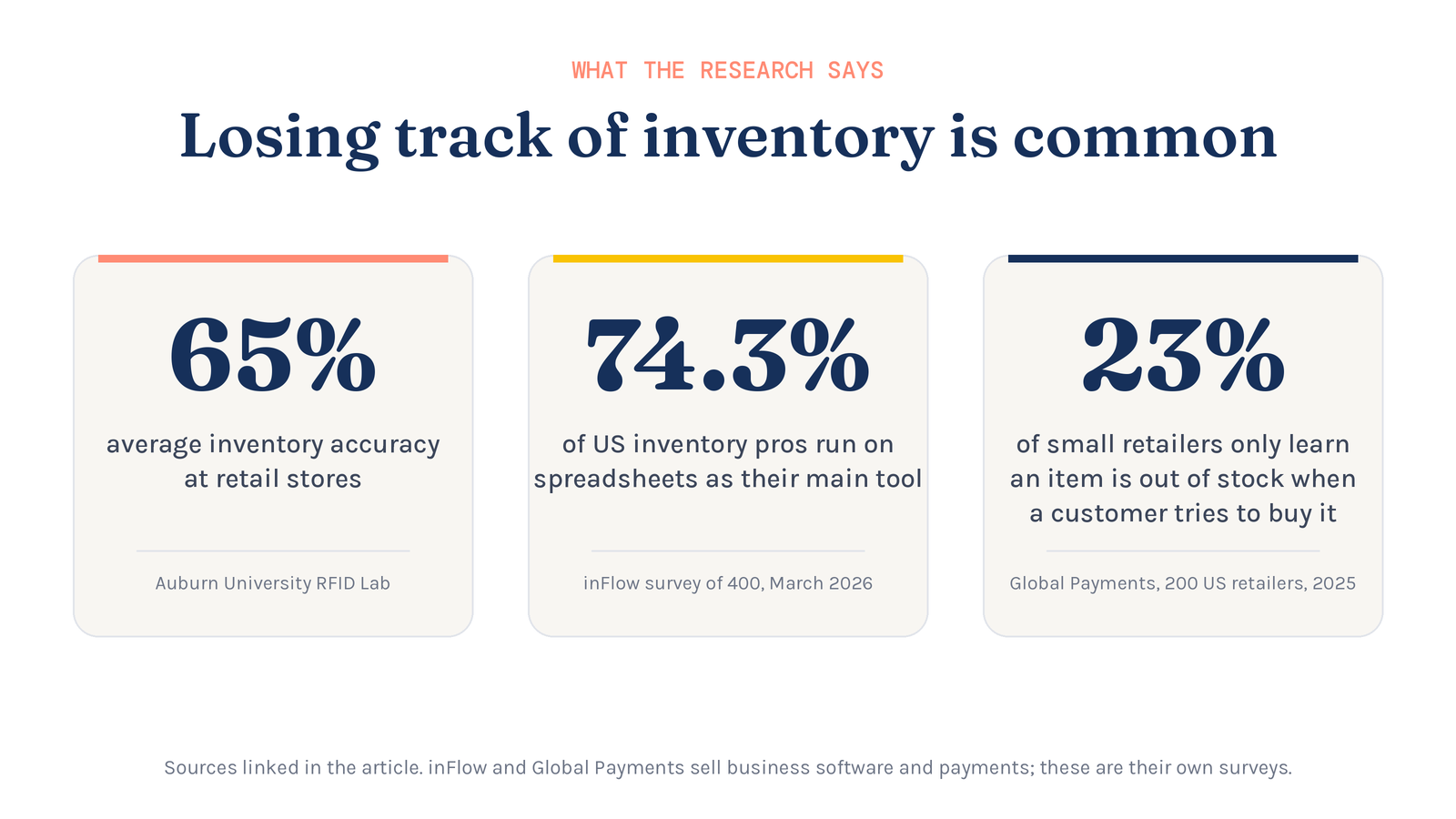
- Retail stores average about 65% inventory accuracy. That figure comes from Auburn University's RFID Lab, as its founder Bill Hardgrave wrote in RFID Journal (opens in a new tab). In plain terms, the system and the shelf often disagree about what's there. You've felt this in the real world when you call or visit a store and they have three of the items you're looking for in the system but nothing is on the shelf. So you drive around to other stores, and the inventory in each one may or may not match what their stock shows.
- 23% of small retailers only learn an item is out of stock when a customer tries to buy it, and 57% still track inventory by hand, in a June 2025 Global Payments survey of 200 US small and mid-sized retailers (opens in a new tab). Global Payments is a payments company, and these are its own survey numbers. That 23% is the yellow-bowl moment: you find out you can't find it when someone is standing in front of you asking for it.
- 74.3% of US inventory professionals use spreadsheets as their only or main tool, and 44% run out of stock at least once a month, in a March 2026 inFlow survey of 400 US operations professionals (opens in a new tab). inFlow sells inventory software, and these are its own survey numbers.
- Administrative and paperwork error made up 21.3% of retail shrink in the National Retail Federation's 2017 survey (opens in a new tab). Shrink is inventory a business paid for but can no longer account for.
- Resellers feel it too. One eBay reseller wrote on Substack (opens in a new tab) about having to cancel two orders because they couldn't find the items in storage, and still hadn't found them.
If stores with full-time systems get their counts wrong this often, a booth business running on spreadsheets and memory is doing well to keep up at all.
What does a lost item really cost a reseller?
A lost item costs you three ways: the money you paid for it, the sale it should have made, and sometimes the customer who asked for it. The woman with the photo would have paid for that bowl on the spot. Instead, the money stayed in her purse, the bowl stayed on your shelf, and her number went wherever lost sticky notes go.
- The item itself. You paid for it, and until you find it, you can't sell it.
- The customer. In the Global Payments survey, 56% of small retailers said they lose up to 10% of customers due to stockouts, and 1 in 4 said they lose even more, for good (Global Payments (opens in a new tab)).
- Sales you didn't know you were missing. In a European study of 7 large retailers (opens in a new tab), correcting inventory records raised sales by roughly 4% to 8%. A record you can trust is a piece you can actually sell.
What happens when you can't find something you sold online?
Now picture the other version of the story: the bowl was listed online, and a buyer clicked Buy before you realized you couldn't find it. Every platform treats a seller who can't fill an order a little differently, but none of them shrug it off. Here's what each one says (checked November 15, 2026):
- eBay. Canceling an order because the item is out of stock counts as a transaction defect. Too many defects can drop you to Below Standard, which can bring higher final value fees and lower placement in search (eBay seller performance policy (opens in a new tab)).
- Etsy. If you can't complete an order, Etsy's seller policy says you must notify the buyer and cancel, and Etsy may reach out to shops that fall below its Seller Service Level Standards (Etsy seller policy (opens in a new tab)).
- Whatnot. Seller cancellations count against your Defect-Free Order Rate, and Whatnot says it warns, then penalizes, sellers who cancel a high rate of orders (Whatnot Account Health (opens in a new tab), Community Guidelines (opens in a new tab)). Since March 2026, Whatnot's terms also allow a cancellation charge of $3 or 3% of the order, whichever is greater, with your first one waived, as Value Added Resource reported (opens in a new tab).
- Poshmark. Sellers who cancel more than 3% of orders in a rolling 90-day period may see their accounts restricted. Buyer-requested and bundling cancellations don't count (Poshmark Seller Updates, January 12, 2026 (opens in a new tab)).
- Vinted. If you cancel an order manually, you might receive automatic negative feedback (Vinted Help Center (opens in a new tab)).
- Facebook Marketplace. For orders with shipping, Facebook says items must be shipped within 7 days and you need at least a 90% on-time shipping rate. Drop below 95% and you'll get a warning before you could lose access to shipping (Facebook Help Center (opens in a new tab)). A bowl you can't find is a bowl you can't ship.
So the same lost bowl that cost you one customer at the booth can cost you a rating, a fee or your account standing online.
The DOT Sale: how we ran a parking lot sale on SOLD Now
The Plano Antique Mall holds a regular parking lot sale, and Marissa's Home set up there on November 14, 2026. This time, I built the whole sale so that no piece, yellow bowl or otherwise, could go missing between the storage unit and the tables, during the clean-up, or once I got back home with the leftover inventory. It was one of the things I learned from the mess of repacking and cleaning up after the Texas Pyrex Swap.
The idea: one dot, one price
I used an image of the Pyrex Dot Bowls and priced everything with colored dots that matched them:
- Red dot (the 401 bowl): $5
- Yellow dot (the 402 bowl): $10
- Blue dot (the 403 bowl): $15
- Green dot (the 404 bowl): $20
We also had special $1, $2 and $3 tables.
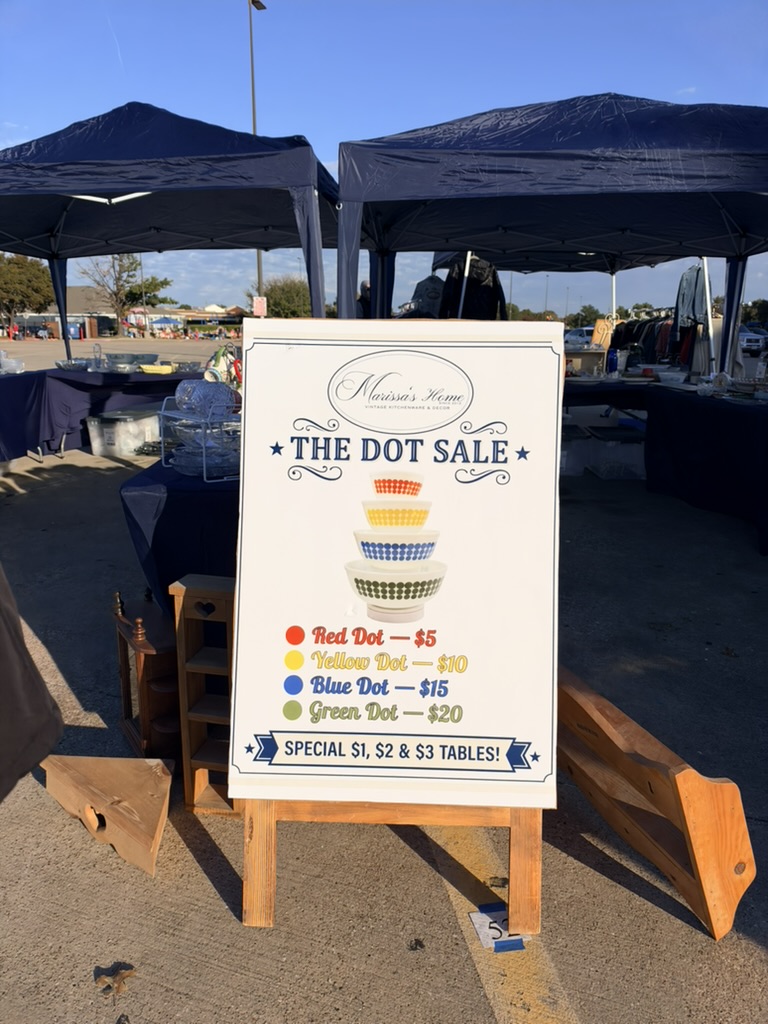
If you know your Pyrex, you're already raising your hand: the smallest Dot bowl's dots are officially orange, not red. You're right. The dot stickers I could find on Amazon came in red, yellow, blue and green, so we went with red (no one at the sale noticed, so I didn't have to explain it). The bowls still nest from smallest to largest, so the price goes up as the bowl gets bigger.
A little history for the glass lovers: Corning released the Dot Bowls in 1968 and sold each one on its own. The smallest, the 401, retailed for 87 cents, according to the Corning Museum of Glass (opens in a new tab). And yes, the yellow 402 from our story would have worn a yellow dot: $10.
Before the sale: one bin for every price
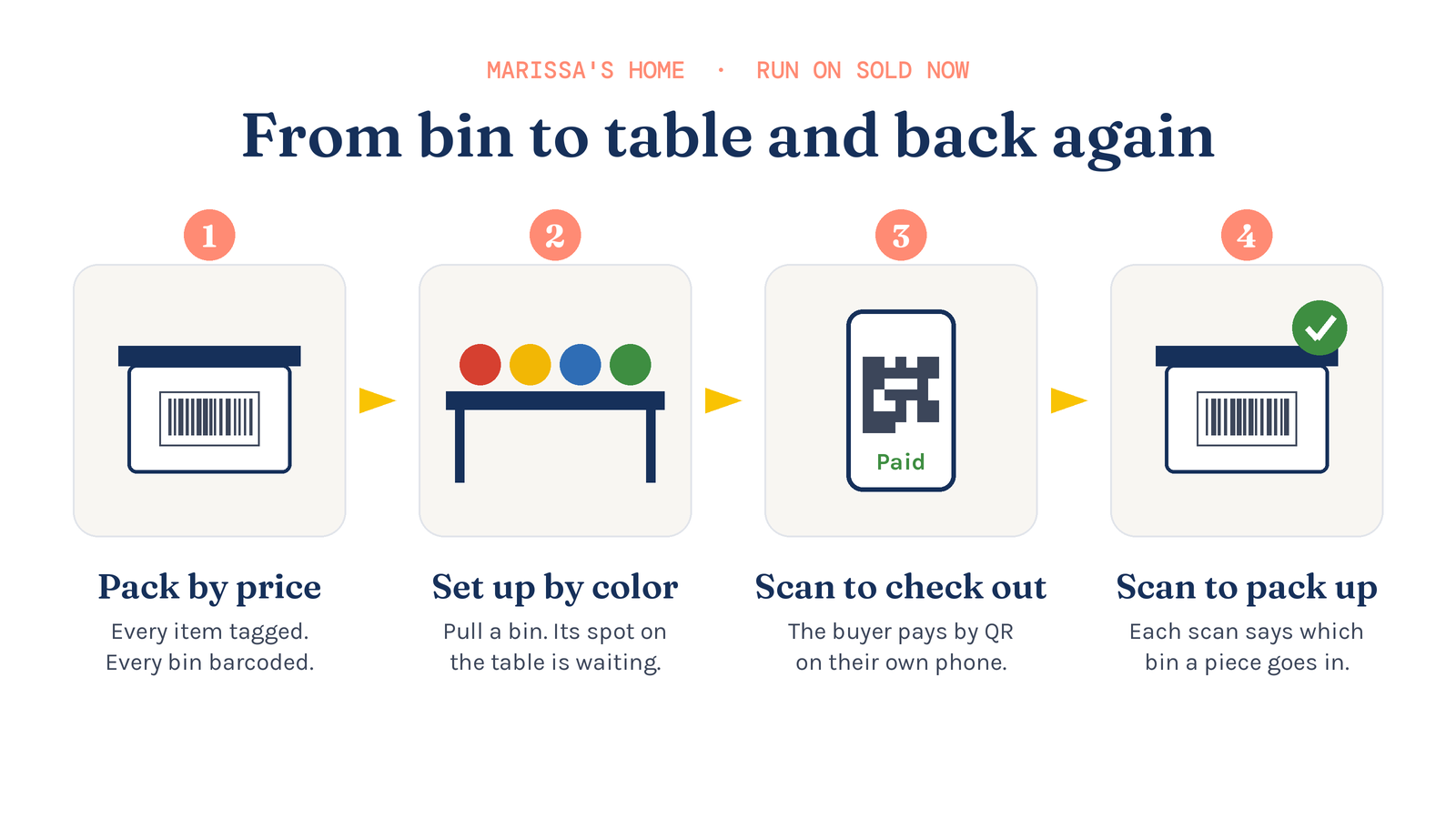
Before the sale, I put every item into labeled, barcoded bins that matched the four bowl tiers. Every item also had its own barcoded SOLD Now product tag. At the Texas Pyrex Swap in September, our lesson was to keep like things together in one bin and log where that bin is. This time, every bin held one price tier.
Setup: pull a bin, find its color
The tables were organized by color too, which meant they were organized by price. When we were setting up the vendor space, it was really easy to pull out a bin and know that everything in it went to one spot on the tables.
Checkout: the buyer stays in control
Checkout was a breeze. Every item had my barcoded product tag, so I could scan each piece as the buyer came over to check out. Once SOLD Now had the total, the buyer scanned the payment QR code on their own phone. I never touched their credit cards. The buyer was in control of the transaction the entire time, and that helped us build trust with our customers. Customers were impressed with the ease of the system. One woman even commented, "Oh, that's easy!"
In SOLD Now, this is the Take Payment button on the invoice. The buyer scans a QR code with their own phone and pays on the payment provider's page, and the screen turns Paid on its own. For a buyer paying cash, the screen shows what's due, what was handed over and the change to give back. Before paying by card, the buyer is also asked for their email address and, in your own wording, whether they'd like to hear from you. Not only can you capture customer info in the moment, there's also an option to add a customer's desired items to the system. If the seller in our story had added her customer's email and the yellow bowl to her desired list, the woman with the photo would be in the customer list instead of on the back of a lost receipt.
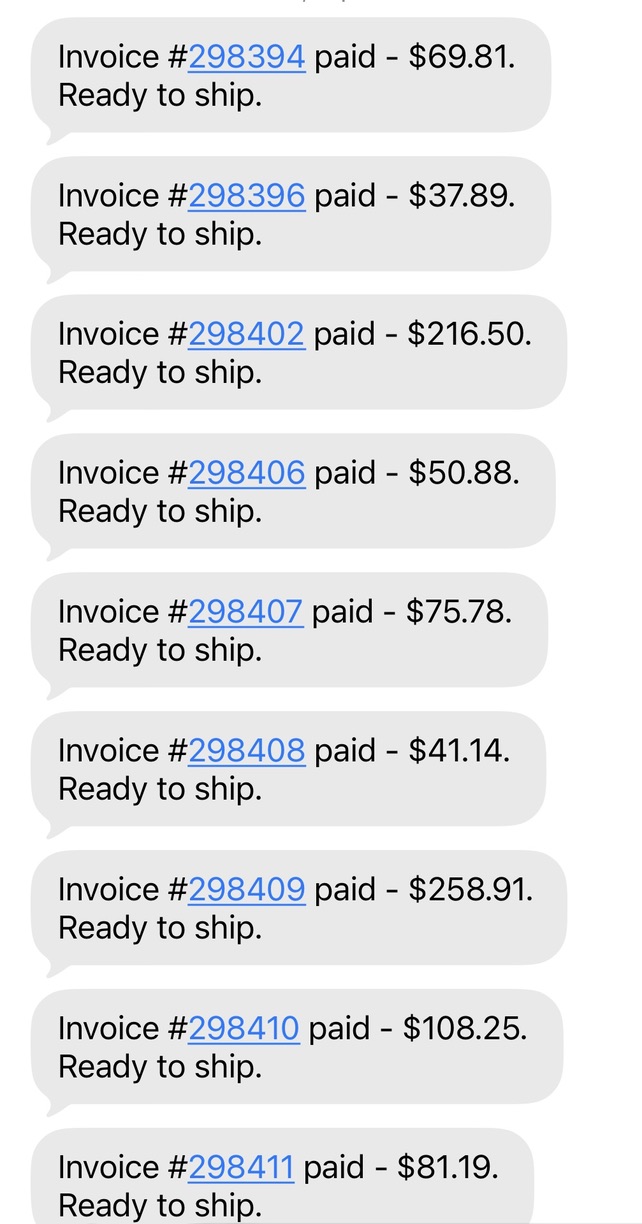
And then there's my phone. Every time an invoice is marked paid in SOLD Now, it sends me a text: "Invoice #298402 paid - $216.50. Ready to ship." In the middle of a busy show, with shoppers asking questions and pieces being wrapped, that text is an added level of checks and balances. In SOLD Now these are My Alerts, on Silver, Gold and Platinum: you choose the phone number and email they go to, and the wording is a template you can edit, or switch off. If the woman with the photo had paid for her bowl at your table, that text is how the person dealing with the public would know the sale was done before the bag left your hands. The one running the checkout would see it on the screen in front of them.
Pack-up: scan it, and it tells you where it goes
After the show, when it was time to pack up, scanning the barcode on each item told us exactly which bin it belonged in. I could even scan an entire table of items and organize them, so I was packing from that table into the correct bin. It made packing up after the show a breeze.
Back at the storage unit
The same setup makes finding an item in the storage unit easy, too. I can look in my system and know which bin to go to, or I can scan the barcode on the bin and see what's inside it.
So here's the story again, the way it goes now. She holds out her phone with the photo of her mother's kitchen. You type "Dot" into Find a Bin, see which bin the yellow 402 is in, and tell her you'll have it at the booth by Saturday. Or you walk out to the car, because the bin is right there. Either way, she goes home with the bowl her mother made cornbread in, and you go home with a customer who will remember you.
Marissa's Take
Organizing items you sell has never been so easy.
Before the show, everything went into labeled, barcoded bins that matched my four price tiers. During the show, the buyer was in control of the transaction the entire time, which helped us build trust with our customers. After the show, packing up was a breeze, and finding an item in the storage unit is easy too, because my system tells me which bin to go to. Putting pieces in the hands of the people who've been looking for them is the part of this business I love most.
How does SOLD Now keep track of every piece?
With Bins, on Gold and Platinum. In SOLD Now, a Bin is any bin, tote or shelf you keep stock in, and every Bin has a code that prints on its label as a barcode. Every shop starts with a ready-made Bin label, and you can design your own in SOLD Now. I design mine on 4" × 6" stickers because they're larger and easier to see, and I print them on my thermal printer. Each bin gets three: one on the end, one on the side and one on the top, so I can find the right bin at a glance.
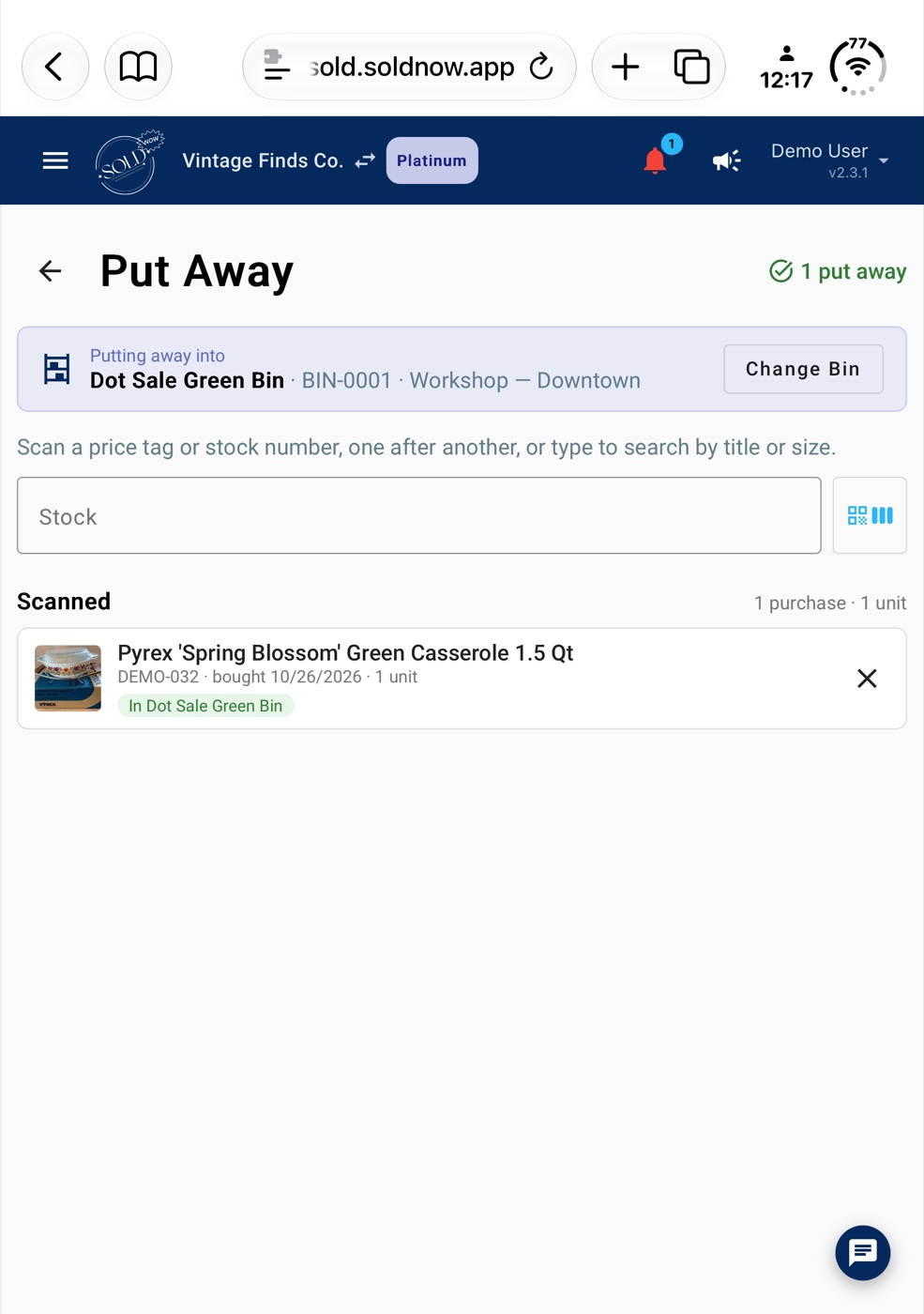
- Put Away. Pick a Bin, then scan the price tag of each piece going into it, one after another. Tap the little barcode icon beside the box to scan with your phone's camera, or use a handheld scanner. Each piece is saved the moment you scan it and shows which Bin it's now in, with a running count at the top.
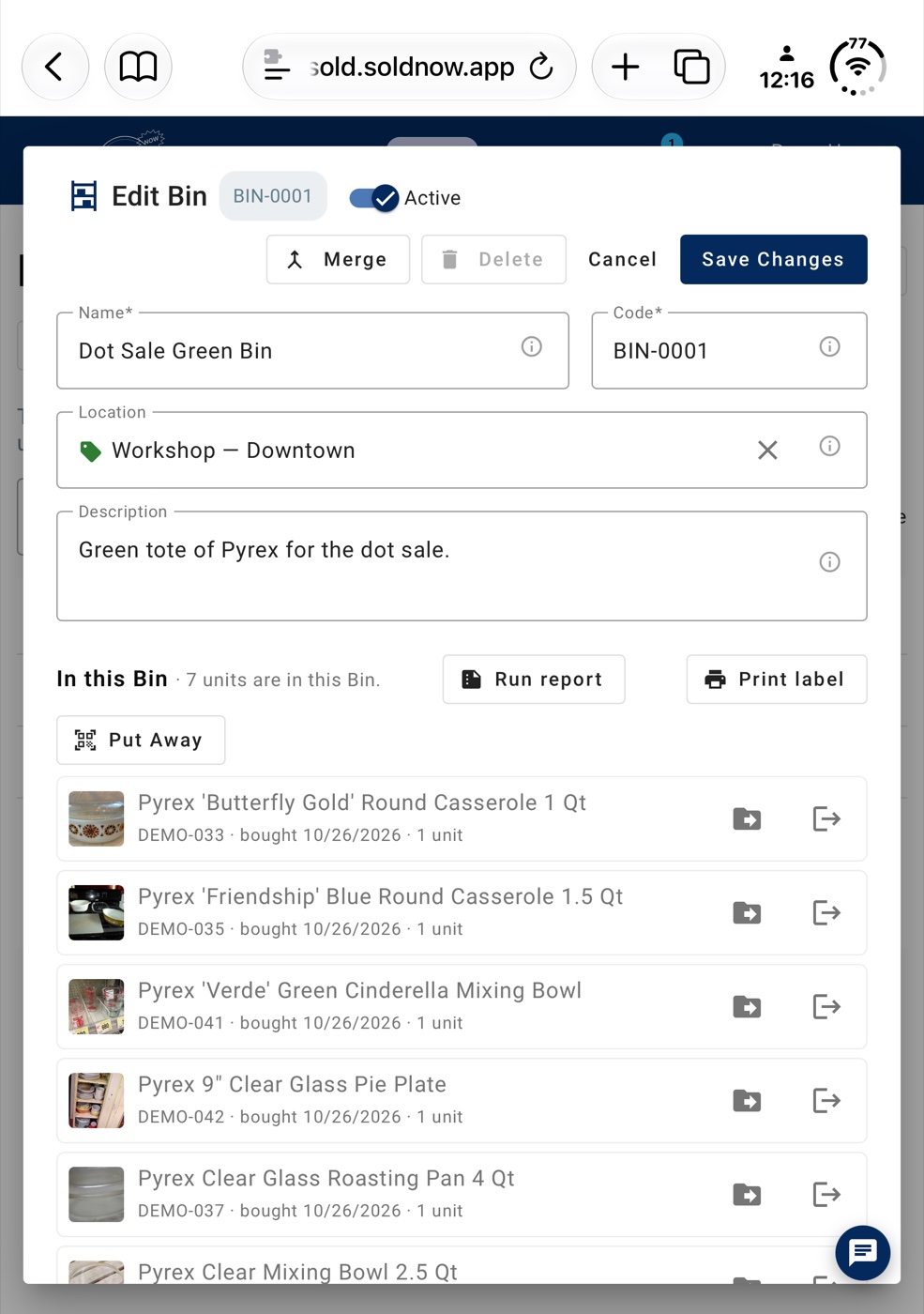
- What's in each Bin. Open a Bin to see everything in it and how many units are inside, with Run report, Print label and Put Away buttons right there. Its count goes down by itself as things sell.
- Where each item is. Every item shows which Bin it's in, and the Bin Contents report lists what's in one Bin or all of them, including stock that isn't in a Bin yet.
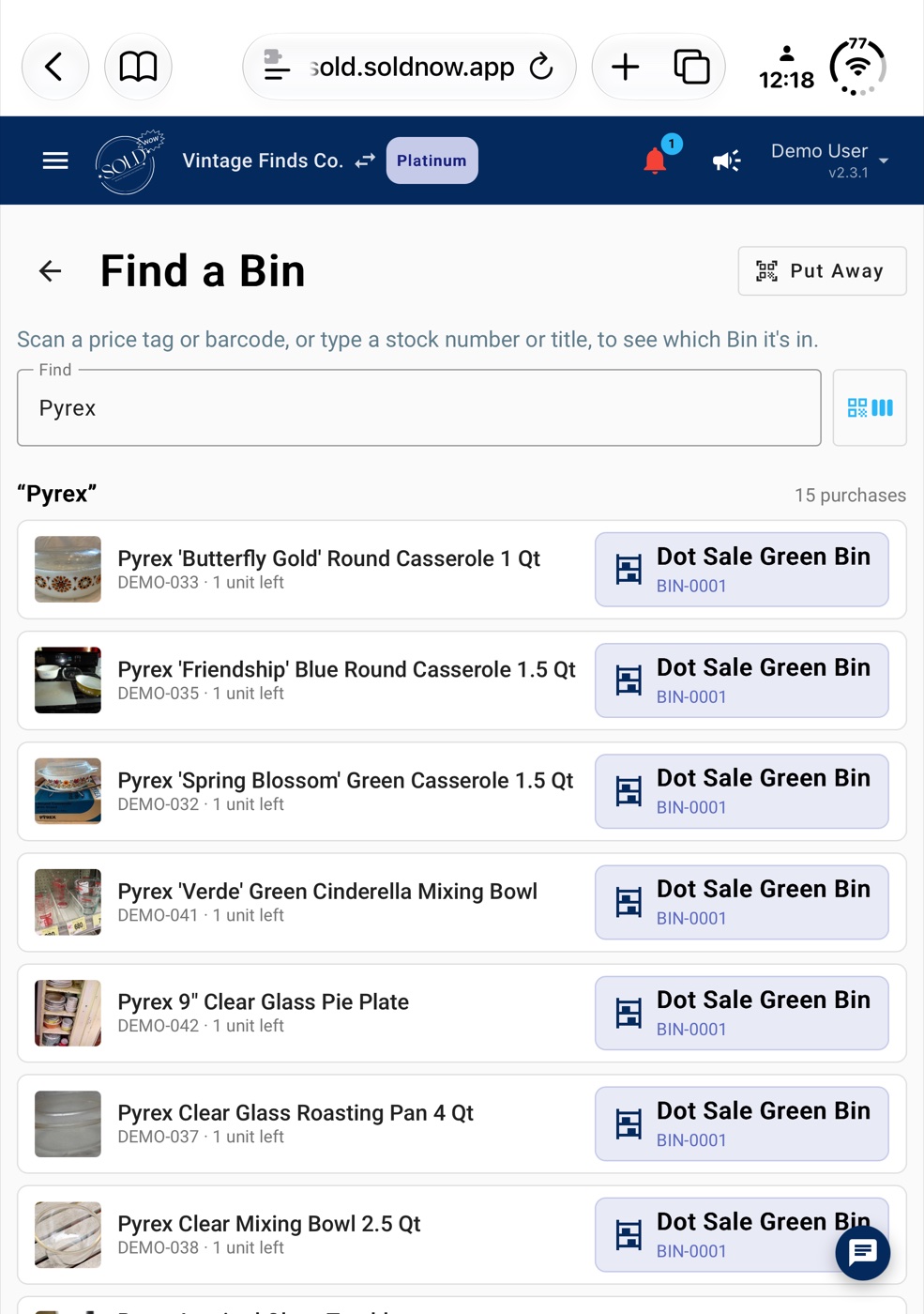
- Find a Bin. Scan a price tag or barcode, or type a stock number or title, and SOLD Now shows which Bin each piece is in. Tap the Bin it's in to move the piece to another. It's the screen that answers the shopper with the photo.
- Scan a Bin to open it. On the Bins screen, press the barcode button beside Search and scan a Bin's label with your phone's camera or a handheld scanner. The Bin opens with everything in it, and a search box inside it finds the one piece you need in a packed tote.
Bins, price tags and invoices for items come with inventory, on Gold ($39.99 a month) and Platinum ($59.99 a month). Every paid plan starts with a 30-day free trial. If you run a booth, our page on inventory for booth dealers shows how the rest of it fits together.
How can you run a DOT-style sale at your next show?
You don't need special software to borrow the idea. Here's the simple version:
- Pick four price tiers and four colors. Use an image your shoppers will recognize, like a Pyrex pattern, or just four bright dot stickers.
- Price and tag everything before the show, then sort it into one bin per tier.
- Label each bin with its color, and a barcode if your system prints one.
- Lay out your tables by color, so every bin has a home before you open it.
- Make checkout a scan, not a search: tag, total, payment.
- Pack up by tier, and put each bin back where your records say it lives.
Frequently Asked Questions
What's the best way to organize inventory for a vendor event?
Group your stock in bins the same way it will go out on your tables (by price, category or color), label each bin, and tag every item so you can tell at a glance, or with a scan, which bin it belongs in. That makes setup, checkout and pack-up the same simple routine.
How do I take payments at a vintage market without handling cards?
Let the buyer pay on their own phone. In SOLD Now, Take Payment on an invoice shows a QR code the buyer scans to pay by card on the payment provider's page (Stripe or PayPal), and it can also show your own Zelle, Venmo or Cash App codes, or work out change for cash.
What happens if I can't find an item I sold online?
You'll usually have to cancel, and most platforms count that against you. eBay counts an out-of-stock cancellation as a transaction defect, Poshmark may restrict sellers who cancel more than 3% of orders in 90 days, and Whatnot can charge a cancellation fee.
Which SOLD Now plan has Bins?
Bins are on Gold and Platinum, along with inventory, price tags and invoices for items. Every paid plan starts with a 30-day free trial, and Bronze is free forever if you only want the Digital Business Card and the Whatnot Raid Train Manager.
SOLD Now: From Spreadsheets to a Real Business System.
Sources
Opened November 14 and 15, 2026.
- Auburn University RFID Lab, via Bill Hardgrave, "The Truth About High Inventory Accuracy," RFID Journal, February 21, 2016 (opens in a new tab)
- Global Payments (a payments company; its own survey of 200 US small and mid-sized retailers, June 2025): retail store stockouts (opens in a new tab) · Unpacking the truth about retail inventory (opens in a new tab)
- inFlow (an inventory software company; its own survey of 400 US professionals, March 2026): State of Inventory Management 2026 (opens in a new tab)
- National Retail Federation, National Retail Security Survey 2017 (opens in a new tab)
- M.B. Musgrove, "Good Problems to Have when Reselling on eBay," Substack, March 23, 2025 (opens in a new tab)
- ECR Retail Loss (Glock, Rekik, Syntetos), Grow sales by improving inventory records (opens in a new tab)
- eBay seller performance policy (opens in a new tab) · Etsy seller policy (opens in a new tab)
- Whatnot: Account Health Dashboard (opens in a new tab) · Community Guidelines (opens in a new tab) · Value Added Resource, Whatnot cancellation fee, March 14, 2026 (opens in a new tab)
- Poshmark, "Introducing Seller Updates," January 12, 2026 (opens in a new tab) · Vinted Help Center, "Canceling an order" (opens in a new tab) · Facebook Help Center, "Shipping performance on Facebook Marketplace" (opens in a new tab)
- Corning Museum of Glass, "Dots (Yellow)" (opens in a new tab)